

Place orders
Plan, then one-click execute
Lines drop. Size is already correct. Brackets attach when you fill.
A NinjaTrader chart strategy that sizes your contracts from the risk you set, then attaches stop and targets when you click Execute.
Trading a prop account? Cust% risks a percent of a balance you enter yourself, such as your drawdown limit, instead of the full balance NinjaTrader shows.
Helping NinjaTrader traders since 2021 · $149 lifetime · 7-day money-back
Live math
Size updates while you drag
Auto brackets
Stop + target attach on fill
Trade management
Multiple TPs, auto stop, half risk
Four short clips. Each one is a single action — plan, scale out, manage the stop, cut risk.
Place orders
Lines drop. Size is already correct. Brackets attach when you fill.
Multiple take profits
TP1, TP2, TP3 on the chart — split the position without a spreadsheet.
Auto stop loss
Once you are in profit, the stop walks. No typing prices mid-trade.
Half risk
Cut size instantly when the tape speeds up.
The clips show the motion. Everything else lives one click away on the chart.
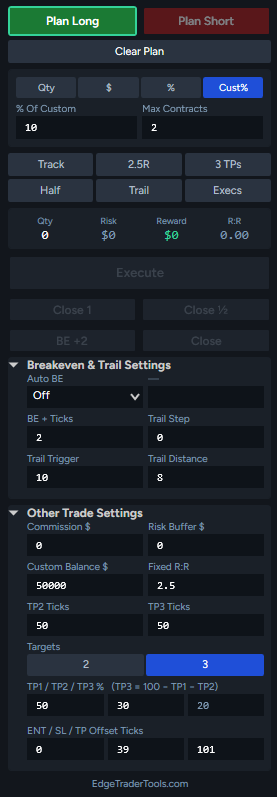
Drops entry, stop, and target lines on the chart for you to drag.
Quantity, Dollar, Percent, or Custom Percent, with a max contracts cap.
Track the market, fixed R:R target, 3 take profits, half risk, trail, and executions on the chart.
Contracts, dollar risk, dollar reward, and R:R update as you drag.
Sends a limit, stop, or market order with your stop and targets attached.
Close 1 contract, close half, move the stop to breakeven + ticks, or close all.
Auto breakeven trigger, breakeven + ticks, and trail trigger, step, and distance.
Custom balance, fixed R:R, take profit ticks and split, commission, and risk buffer.
One-time payment · 7-day money-back
Full flow · click to play larger
Plan → size → execute → brackets. Watch the whole loop when you are ready.
Don't just take our word for it. Here is what the community is saying about Edge Trader Tools.
"Love the product; it is particularly helpful in a fast moving market sequence. NICE WORK!"
"I'm writing to express my satisfaction with your product. I've been using it for awhile and have already noticed a positive impact on my performance."
"Really appreciate your guys fast reply and good looking product. Working perfectly!"
"It has completely transformed how I approach risk management. The position sizing calculator alone has saved me from several costly mistakes."
Pay once, trade forever. No monthly fees, no surprises.
Perfect for getting started.
For traders with multiple stations.
Runs as a NinjaTrader 8 chart strategy: connect to your data feed and enable it on the chart each session. Why?
Prices in USD. All licenses are permanent with lifetime updates included.
Not a fit? Request a full refund within 7 days — no questions asked.
"Buy once. Own it forever. No renewals."
Questions before you buy? contact@edgetradertools.com
Everything you need to know about getting started.
NinjaTrader will not run a chart strategy unless you are connected to a data feed and the strategy is enabled. That is a NinjaTrader requirement, not a setting we can remove.
Closing NinjaTrader disables the strategy. If the panel is missing, reconnect to data and enable it again.
Your license key and the .zip download are in your account under Downloads right after purchase.
Step-by-step screenshots are in the installation guide.
A NinjaTrader 8 add-on for traders who want their risk management and order management handled automatically instead of in their head.
Edge Trader Tools works as a position size calculator for NinjaTrader that runs directly on the chart: set a dollar or percentage risk per trade, and the tool sizes every position from your stop distance — with a max-contract safeguard you cannot accidentally exceed. The differentiator is the live math. As you drag your entry, stop, and target lines, the dollar risk, contract quantity, and risk-reward ratio update in real time. No spreadsheet, no mental arithmetic in the heat of execution.
When your entry order fills, the stop loss and take profit attach automatically as a bracket (OCO) order. There is no window where your position sits unprotected and no chance of fat-fingering the wrong quantity. That makes Edge Trader Tools as much a NinjaTrader order management add-on as a position sizing tool — the two jobs that cost discretionary futures traders the most money are both automated at the platform level.
Split a position across up to three take profits. Move the stop to breakeven plus a few ticks with one click, or automatically at a profit in ticks, at a risk-reward multiple, or when the first target fills. The built-in NinjaTrader trailing stop starts from its own trigger and can tighten after the second target. Close one contract or half the position without touching the order ticket.
NinjaTrader shows a prop account's full balance, not the drawdown you are actually allowed to lose. Custom Percent (Cust%) sizes every trade as a percent of a balance you enter yourself, such as your drawdown limit, so a 1% risk means 1% of the money you can really lose.
Edge Trader Tools runs exclusively on NinjaTrader 8 — including the free simulation version — so you can practice sized, bracketed trades before risking real capital. It is a one-time $149 lifetime license (a dual license for two machines is $199), with free lifetime updates and a 7-day money-back guarantee — no subscription. New to futures risk math? Start with our guide to risk management techniques for day traders or read how the tool fits a comparison of the best NinjaTrader order-management add-ons.


